

Introduction
Welcome to the GigeNET API version 2. This API is more secure, provides greater flexibility as well as compatibility with a large range of tools and SDKs. We recommend that all new integrations are built using this API.
This API version has been designed to be compatible to as large degree as possible with the Amazon Webservices API focusing primarily on the so-called Elastic Compute Cloud API. Compatibility with this API means that you can use the many different SDK available for different languages to interface with GigeNET's API just as you would Amazon web services. Some tools written for AWS might work without modification for use with our API, while others might require minimal changes. In addition to that, you can of course also set-up requests and connections directly to our API by easily implementing the interface yourself.
This guide is meant for you to aquaint yourself with the subset of the AWS API that we implement. You can also reference with the AWS API for more details, though beware that our API might ignore certain parameters specified in the AWS API documentation if they are incompatible or have no meaning with regards to our infrastructure.
Overview of API
For each API request you construct a query string which is then cryptographically signed using your authentication details. The API will process your request and then either return an error, a return of value or data set based on your API action. You can provide arguments to the API either as part of the query string or via parameters sent as part of the request body.
Return values are returned as an XML document, containing the specified return values for each API function. If you need more examples of how the return values might look you can always also refer to the AWS API documentation for the corresponding API function call.
In case of errors, you will receive an HTTP error return code (400, 401 or 500) along with an XML document describing the error.
The GigeNET API server URL is https://api.thegcloud.com. All API actions should be sent to the API server URL.
Supported AWS SDKs
All standard AWS SDKs should work with the API. Compatibility has been verified for the following:
- AWS PHP SDK
- AWS Ruby SDK
- boto2 (Python)
- boto3 (Python)
Other SDKs can be found on the AWS pages.
Installing the SDK
# Install pip if required
easy_install pip

# Install the boto2 SDK
pip install boto
# Install pip if required
easy_install pip

# Install the boto2 SDK
pip install boto3
# Install composer
curl -sS https://getcomposer.org/installer | php

# Install the latest AWS SDK
php composer.phar require aws/aws-sdk-php
# Install the latest AWS SDK
gem install aws-sdk
// Install the GigeNET API library for Golang
go get github.com/gigenet-projects/gcloud-golang-api/api
The SDKs can be installed using the standard package managers for your chosen languages.
Even though using one of these SDKs is the simplest way to access the API, you can also manually use the REST API using custom code to create integrations without an SDK. In this documentation we have provied some examples of how to authenticate and make API calls without using an SDK.
Creating API tokens
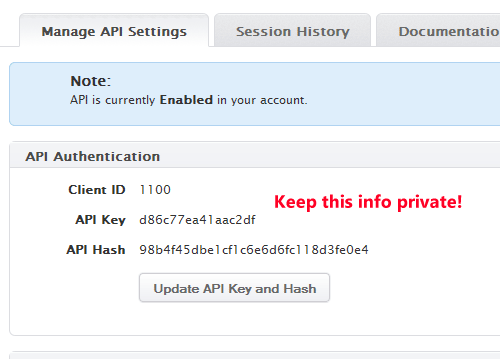
Before you can use the API, you will need to enable it, create a new API applications and generate API keys which you will then be using to authenticate with the API. You can access the API settings rom the GigeNET client dashboard.
Step 1. Create a new API application in the GigeNET client dashboard.


Step 2. Enable the use of the GigeNET API in your API settings.

Step 3. Now click "Update API Key and Hash" to obtain your API key and hash code.

Connecting to the API
import boto

conn = boto.connect_ec2_endpoint(
    'https://api.thegcloud.com',
    'APIKEY',
    'APIHASH')
import boto3

conn = boto3.client('ec2',
        endpoint_url='https://api.thegcloud.com',
        aws_access_key_id='APIKEY',
        aws_secret_access_key='APIHASH',
        region_name='ord1');
<?php

require('vendor/autoload.php');

use \Aws\Ec2\Ec2Client;

$ec2Client = Ec2Client::factory(array(
  'endpoint' => 'https://api.thegcloud.com',
  'region' => 'ord1',