

Architecture
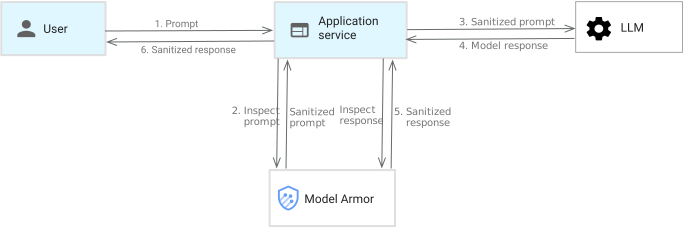
This diagram shows an application using Model Armor to protect an LLM and a user. The following steps explain the data flow:
- You provide a prompt to the application.
- Model Armor inspects the incoming prompt for potentially sensitive content.
- The prompt (or sanitized prompt) is sent to the LLM.
- The LLM generates a response.
- Model Armor inspects the generated response for potentially sensitive content.
- The response (or sanitized response) is sent to you. Model Armor sends a detailed description of triggered and untriggered filters in the response.
Model Armor filters both input (prompts) and output (responses) to prevent the LLM from exposure to or generation of malicious or sensitive content.
Network requirements
To access Model Armor regional endpoints from within a VPC network, you must create a Private Service Connect endpoint to the Model Armor APIs. This is required to prevent certificate errors when regional endpoints are accessed using Private Google Access or VPC Service Controls. For more information, see Troubleshoot Model Armor issues and About accessing regional endpoints through Private Service Connect endpoints.
Use cases
Model Armor has several use cases across security, trust and safety, and responsible AI, which include the following:
- Mitigate the risk of leaking sensitive intellectual property (IP) and personally identifiable information (PII) in LLM prompts or responses.
- Protect against prompt injection and jailbreak attacks, preventing malicious actors from manipulating AI systems to perform unintended actions.
- Scan text in PDFs for sensitive or malicious content.
- Prevent your chatbot from recommending competitor solutions, maintaining brand integrity and customer loyalty.
- Filter social media posts generated by AI applications that contain harmful messaging, such as dangerous or hateful content.
Model Armor templates
Model Armor templates let you configure how Model Armor screens prompts and responses. They function as sets of customized filters and thresholds for different safety and security confidence levels, which lets you control what content is flagged.
The thresholds represent confidence levels—how confident
Model Armor is that the prompt or response includes offending
content. For example, you can create a template that filters prompts for hateful
content with a HIGH threshold, meaning Model Armor reports high
confidence that the prompt contains hateful content. A LOW_AND_ABOVE threshold
indicates any level of confidence (LOW, MEDIUM, and HIGH) in making that
claim.
For more information, see Model Armor templates.
Model Armor confidence levels
You can set confidence levels for responsible AI safety categories (sexually explicit, dangerous, harassment, and hate speech), prompt injection and jailbreak detection, and sensitive data protection (including topicality).
For confidence levels that support granular thresholds, Model Armor interprets them as follows:
- High: Identifies content with a high likelihood of violation.
- Medium and above: Identifies content with a medium or high likelihood of violation.
- Low and above: Identifies content with a low, medium, or high likelihood of violation.
Filter sensitivity controls the detection rate. A lower threshold identifies more events but might increase the frequency of false positives.
| Confidence level | Detection probability | False positive risk | Recommended use case |
|---|---|---|---|
| High | Only flags content with near-certainty of a violation. | Very low | Production environments that prioritize uninterrupted user interactions. |
| Medium and above | Flags content with a balanced degree of confidence. | Moderate | Standard enterprise applications. Offers a middle ground between strong protection and acceptable false positive rates. Suitable for general content safety. |
| Low and above | Flags any content with even a slight indication of a violation. | High | Use with caution. Potentially suitable for high-stakes categories like prompt injection and jailbreak detection, where preventing false negatives is critical, even at the risk of accepting false positives. Not recommended for general responsible AI content categories due to the high risk of blocking harmless content. |
Considerations and best practices
- Decouple templates: Configure separate Model Armor
templates for user prompts and model responses. User inputs and model
outputs have different risk profiles and objectives:
- Input template: Focused on preventing malicious inputs, prompt injections, jailbreak attempts, and uploading sensitive data.
- Output template: Focused on preventing the model from leaking sensitive data, generating harmful or off-brand content, or returning malicious URLs. Separating templates lets you have more granular control, better traceability of blocks, and easier tuning.
- False positive impact: False positives can degrade the user experience
by incorrectly blocking legitimate prompts or responses. The
Low and abovesetting, while thorough, can cause a high volume of false positives in AI applications. - Category-specific tuning: The optimal filter level depends on the
category of harm you are trying to prevent. For example, for both prompt
injection and jailbreak detection and general content safety (hate speech,
harassment, dangerous content), start with
HighorMedium and aboveto minimize false positives. - Iterative testing: Always test your filter configurations against a representative dataset of prompts and responses, including known good and bad examples. Establish a baseline for false positives and adjust levels accordingly.
- Monitoring: Continuously monitor the filter performance in production to catch unexpected blocking behavior or sudden increases in false positives.
- User feedback: Provide a mechanism for users to report instances where content was incorrectly blocked. This feedback is invaluable for tuning filter levels.
Example configuration strategy
- Initial deployment:
- Set general responsible AI filters (hate speech and harassment) to
High. - Set prompt injection and jailbreak detection filters to
Medium. For applications like Gemini Enterprise, set the threshold toHighto avoid false positives. - Use advanced Sensitive Data Protection template to configure the required infotypes for your use case; basic Sensitive Data Protection provides limited infotypes, mainly addressed to the US region.
- Set general responsible AI filters (hate speech and harassment) to
- Testing and validation:
- Test thoroughly with a set of known safe queries to ensure they aren't blocked.
- Evaluate the false positive rate on typical user traffic.
- Adjustment:
- If you continue to experience a high volume of false positives, change
the threshold to
High. - If protection against a specific category seems insufficient, cautiously consider lowering the threshold for that category only, after thorough testing.
- If you continue to experience a high volume of false positives, change
the threshold to
By carefully selecting filter levels based on the specific risk and tolerance for false positives for each category, you can optimize the effectiveness of Model Armor. To report false positives and false negatives, contact Cloud Customer Care.
Model Armor filters
Model Armor offers a variety of filters to help you provide safe and secure AI models. The following filter categories are available.
Responsible AI safety filter
You can screen prompts and responses at the specified confidence levels for the following categories:
| Category | Definition |
|---|---|
| Hate speech | Negative or harmful comments targeting identity and/or protected attributes. |
| Harassment | Threatening, intimidating, bullying, or abusive comments targeting another individual. |
| Sexually explicit | Contains references to sexual acts or other lewd content. |
| Sexually suggestive1 | Suggests sexual acts or other lewd content. |
| Dangerous content | Promotes or enables access to harmful goods, services, and activities. |
| Violence1 | Contains references to violent content. |
| CSAM | Contains references to child sexual abuse material (CSAM). This filter is applied by default and cannot be turned off. |
1The sexually suggestive and violence filters are available only in Model Armor templates and not in floor settings.
Prompt injection and jailbreak detection
Prompt injection is a security vulnerability where attackers craft special commands within the text input (the prompt) to trick an AI model. This can make the AI ignore its usual instructions, reveal sensitive information, or perform actions it wasn't designed to do.
Jailbreaking in the context of LLMs refers to the act of bypassing the safety protocols and ethical guidelines that are built into the model. This lets the LLM generate responses that it was originally designed to avoid, such as harmful, unethical, and dangerous content.
When prompt injection and jailbreak detection is enabled, Model Armor scans prompts and responses for malicious content. If detected, Model Armor blocks the prompt or response.
Sensitive Data Protection
Sensitive Data Protection is a Google Cloud service that helps you discover, classify, and de-identify sensitive data. Sensitive Data Protection can identify sensitive elements, context, and documents to help you reduce the risk of data leakage going into and out of AI workloads. You can use Sensitive Data Protection directly within Model Armor to transform, tokenize, and redact sensitive elements while retaining non-sensitive context. Model Armor can accept existing inspection templates, which function as blueprints to streamline the process of scanning and identifying sensitive data specific to your business and compliance needs. This ensures consistency and interoperability between other workloads that use Sensitive Data Protection.
Model Armor offers two modes for Sensitive Data Protection configuration:
Basic configuration: In this mode, you configure Sensitive Data Protection by specifying the types of sensitive data to scan for. This mode supports the following categories:
- Credit card number
- US social security number (SSN)
- Financial account number
- US individual taxpayer identification number (ITIN)
- Google Cloud credentials
- Google Cloud API key
Basic configuration only supports inspection operations and doesn't support the use of Sensitive Data Protection templates. For more information, see Basic Sensitive Data Protection configuration.
Advanced configuration: This mode offers more flexibility and customization through Sensitive Data Protection templates. Sensitive Data Protection templates are predefined configurations that let you specify more granular detection rules and de-identification techniques. Advanced configuration supports both inspection and de-identification operations. For more information, see Advanced Sensitive Data Protection configuration.
Confidence levels for Sensitive Data Protection operate differently than confidence levels for other filters. For more information about confidence levels for Sensitive Data Protection, see Sensitive Data Protection match likelihood. For more information about Sensitive Data Protection in general, see Sensitive Data Protection overview.
Malicious URL detection
Malicious URLs are often disguised to look legitimate, making them a potent tool for phishing attacks, malware distribution, and other online threats. For example, if a PDF contains an embedded malicious URL, it can be used to compromise any downstream systems processing LLM outputs.
When malicious URL detection is enabled, Model Armor scans URLs to identify whether they're malicious. This lets you take action and prevent malicious URLs from being returned.
Model Armor extracts URLs until it reaches 256 URLs or the end of the payload, and scans only the first 256 URLs found in prompts and responses.
Define the enforcement type
Enforcement defines what happens after a violation is detected. To configure how Model Armor handles detections, you set the enforcement type. Model Armor offers the following enforcement types:
- Inspect only: In this mode, Model Armor analyzes the content against the configured security and safety policies. If a violation is found, it logs the details to Cloud Logging for monitoring and analysis. However, it doesn't stop the request or response from being processed by the integrated service. This is useful for testing new policies, understanding potential violation rates, and auditing without affecting live traffic. To gain value from this mode, Cloud Logging must be enabled.
- Inspect and block: This mode provides active protection. When Model Armor detects a violation, it not only logs the event but also prevents the offending content from proceeding. For example, a non-compliant prompt is blocked before reaching the model, or an unsafe model response is stopped before being sent to the user.
The choice of enforcement type is fundamental to how your Model Armor integration behaves and the level of protection it enforces. This setting can typically be configured within Model Armor templates and floor settings, allowing different levels of enforcement for various use cases and integrated services. For more information, see Define the enforcement type for templates and Define the enforcement type for floor settings.