The Java Plugin
The Java plugin adds Java compilation along with testing and bundling capabilities to a project. It serves as the basis for many of the other JVM language Gradle plugins. You can find a comprehensive introduction and overview to the Java Plugin in the Building Java Projects chapter.
|
As indicated above, this plugin adds basic building blocks for working with JVM projects.
Its feature set has been superseded by other plugins, offering more features based on your project type.
Instead of applying it directly to your project, you should look into the |
Usage
To use the Java plugin, include the following in your build script:
plugins {
    id 'java'
}plugins {
java
}Tasks
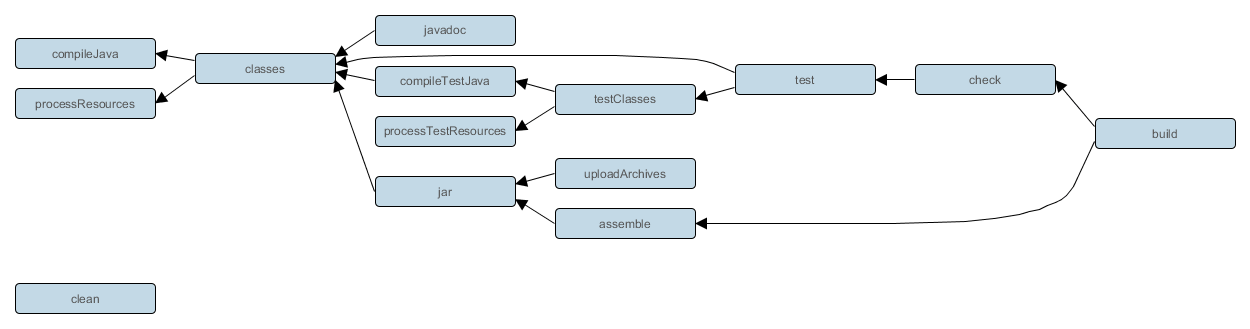
The Java plugin adds a number of tasks to your project, as shown below.
compileJava— JavaCompile-
Depends on: All tasks which contribute to the compilation classpath, including
jartasks from projects that are on the classpath via project dependenciesCompiles production Java source files using the JDK compiler.
processResources— ProcessResources-
Copies production resources into the production resources directory.
classes-
Depends on:
compileJava,processResourcesThis is an aggregate task that just depends on other tasks. Other plugins may attach additional compilation tasks to it.
compileTestJava— JavaCompile-
Depends on:
classes, and all tasks that contribute to the test compilation classpathCompiles test Java source files using the JDK compiler.
processTestResources— Copy-
Copies test resources into the test resources directory.
testClasses-
Depends on:
compileTestJava,processTestResourcesThis is an aggregate task that just depends on other tasks. Other plugins may attach additional test compilation tasks to it.
jar— Jar-
Depends on:
classesAssembles the production JAR file, based on the classes and resources attached to the
mainsource set. javadoc— Javadoc-
Depends on:
classesGenerates API documentation for the production Java source using Javadoc.
test— Test-
Depends on:
testClasses, and all tasks which produce the test runtime classpathRuns the unit tests using JUnit or TestNG.
clean— Delete-
Deletes the project build directory.
cleanTaskName— Delete-
Deletes files created by the specified task. For example,
cleanJarwill delete the JAR file created by thejartask andcleanTestwill delete the test results created by thetesttask.
SourceSet Tasks
For each source set you add to the project, the Java plugin adds the following tasks:
compileSourceSetJava— JavaCompile-
Depends on: All tasks which contribute to the source set’s compilation classpath
Compiles the given source set’s Java source files using the JDK compiler.
processSourceSetResources— Copy-
Copies the given source set’s resources into the resources directory.
sourceSetClasses— Task-
Depends on:
compileSourceSetJava,processSourceSetResourcesPrepares the given source set’s classes and resources for packaging and execution. Some plugins may add additional compilation tasks for the source set.
Lifecycle Tasks
The Java plugin attaches some of its tasks to the lifecycle tasks defined by the Base Plugin — which the Java Plugin applies automatically — and it also adds a few other lifecycle tasks:
assemble-
Depends on:
jar, and all other tasks that create artifacts attached to thearchivesconfigurationAggregate task that assembles all the archives in the project. This task is added by the Base Plugin.
check-
Depends on:
testAggregate task that performs verification tasks, such as running the tests. Some plugins add their own verification tasks to
check. You should also attach any customTesttasks to this lifecycle task if you want them to execute for a full build. This task is added by the Base Plugin. build-
Depends on:
check,assembleAggregate tasks that performs a full build of the project. This task is added by the Base Plugin.
buildNeeded-
Depends on:
build, andbuildNeededtasks in all projects that are dependencies in thetestRuntimeClasspathconfiguration.Performs a full build of the project and all projects it depends on.
buildDependents-
Depends on:
build, andbuildDependentstasks in all projects that have this project as a dependency in theirtestRuntimeClasspathconfigurationsPerforms a full build of the project and all projects which depend upon it.
buildConfigName— task rule-
Depends on: all tasks that generate the artifacts attached to the named — ConfigName — configuration
Assembles the artifacts for the specified configuration. This rule is added by the Base Plugin.
uploadConfigName— task rule, type: Upload-
Depends on: all tasks that generate the artifacts attached to the named — ConfigName — configuration
Assembles and uploads the artifacts in the specified configuration. This rule is added by the Base Plugin.
The following diagram shows the relationships between these tasks.
Project layout
The Java plugin assumes the project layout shown below. None of these directories need to exist or have anything in them. The Java plugin will compile whatever it finds, and handles anything which is missing.
src/main/java-
Production Java source.
src/main/resources-
Production resources, such as XML and properties files.
src/test/java-
Test Java source.
src/test/resources-
Test resources.
src/sourceSet/java-
Java source for the source set named sourceSet.
src/sourceSet/resources-
Resources for the source set named sourceSet.
Changing the project layout
You configure the project layout by configuring the appropriate source set. This is discussed in more detail in the following sections. Here is a brief example which changes the main Java and resource source directories.
sourceSets {
    main {
        java {
            srcDirs = ['src/java']
        }
        resources {
            srcDirs = ['src/resources']
        }
    }
}sourceSets {
main {
java {
setSrcDirs(listOf("src/java"))
}
resources {
setSrcDirs(listOf("src/resources"))
}
}
}Source sets
The plugin adds the following source sets:
main-
Contains the production source code of the project, which is compiled and assembled into a JAR.
test-
Contains your test source code, which is compiled and executed using JUnit or TestNG. These are typically unit tests, but you can include any test in this source set as long as they all share the same compilation and runtime classpaths.
Source set properties
The following table lists some of the important properties of a source set. You can find more details in the API documentation for SourceSet.
name— (read-only)String-
The name of the source set, used to identify it.
output— (read-only) SourceSetOutput-
The output files of the source set, containing its compiled classes and resources.
output.classesDirs— (read-only) FileCollection-
Default value:
$buildDir/classes/java/$name, e.g. build/classes/java/mainThe directories to generate the classes of this source set into. May contain directories for other JVM languages, e.g. build/classes/kotlin/main.
output.resourcesDir—File-
Default value:
$buildDir/resources/$name, e.g. build/resources/mainThe directory to generate the resources of this source set into.
compileClasspath— FileCollection-
Default value:
${name}CompileClasspathconfigurationThe classpath to use when compiling the source files of this source set.
annotationProcessorPath— FileCollection-
Default value: