


Cloud environments rarely stay with one provider for long. As application requirements grow more specific, no single provider's services fit every workload equally well, which is why combining providers has become a common approach.
Multi-cloud is a cloud strategy that uses services from multiple providers and works differently from a single-cloud or hybrid cloud setup. Organizations adopt a multi-cloud strategy to access services better suited to their needs, meet geographic or regulatory requirements, or avoid depending on one provider's roadmap and pricing.
This article explains what multi-cloud means, how it works, and how its architecture compares with hybrid cloud and other deployment models. It also covers the benefits, challenges, and use cases where this setup is the right choice.
What Is Multi-Cloud?
Multi-cloud is a cloud computing strategy that uses services from two or more cloud providers. An organization might use one provider for a specific application, another for a specialized service, and a third to reach users in a particular region. The clouds involved do not need to be connected or run identical workloads.
Organizations choose their providers based on several factors:
- Service capabilities. One provider's managed database or AI service may fit a workload better than another's.
- Performance requirements. Some workloads need processing power or networking capacity that only certain providers offer.
- Pricing. Providers price services differently, and costs shift depending on usage patterns.
- Existing infrastructure. Prior investments, contracts, or acquired systems determine which provider is already part of the environment.
For example, an organization might run its primary application on one provider while using a second provider's analytics service or a third for better pricing on a specific service.
How Does Multi-Cloud Work?
A multi-cloud environment starts with deciding which workloads belong in each cloud, based on factors such as application requirements, performance needs, and geographic or compliance requirements.
Once teams assign workloads, they deploy and manage them across the selected environments. Some applications stay within a single cloud, while others communicate across providers. Data may also be replicated, transferred, or stored in different environments depending on what the application needs.
Managing these environments requires consistent processes for identity, security, networking, monitoring, automation, and cost control. Each provider has its own cloud application programming interfaces (APIs), services, and configuration model, so teams need a way to maintain visibility and apply policy consistently across all of them.
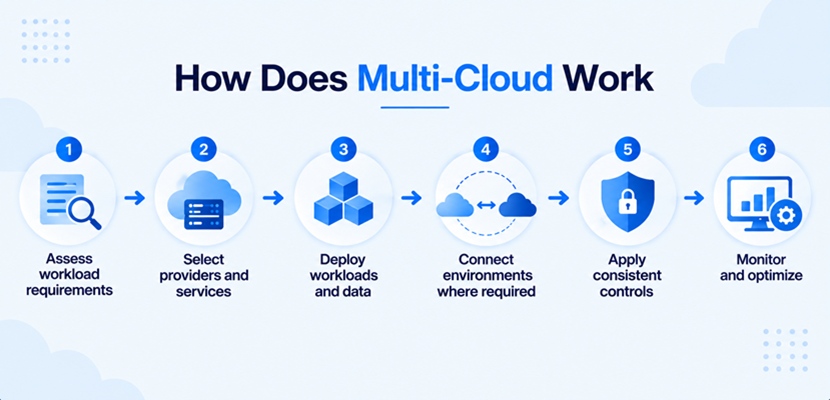
A multi-cloud workflow involves:
- Assessing workload requirements. Determine which technical, business, geographic, and compliance factors affect where a workload should run.
- Selecting providers and services. Match each workload to the cloud environment that best meets its requirements.
- Deploying workloads and data. Provision the infrastructure and services each environment needs.
- Connecting environments where required. Configure networking, identity, and data flows between clouds that need to communicate.
- Applying consistent controls. Manage security, access, configuration, and monitoring across all providers.
- Monitoring and optimizing. Track performance, availability, and cost, then adjust workloads as requirements change.
The workflow does not require every workload to run on every cloud. A multi-cloud environment can stay intentionally segmented when there is no technical reason to connect the environment.
Multi-Cloud Architecture
Building a multi-cloud architecture means using resources from multiple providers to meet specific application and infrastructure requirements. It can be simple, with separate workloads running independently in different clouds, or highly integrated, with applications, data, networking, and management systems spanning providers.
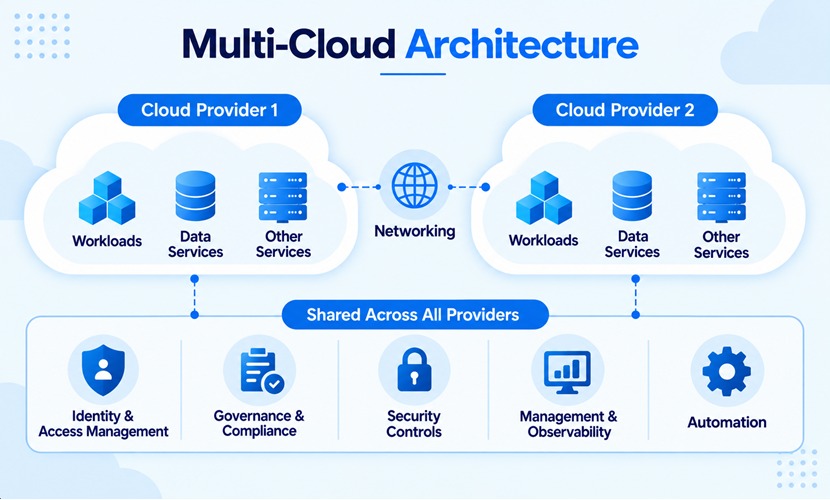
The main architectural components include:
- Cloud environments. Public or private cloud resources supplied by multiple providers, including the specific regions, availability zones, and service tiers (IaaS, PaaS, SaaS) chosen for each workload.
- Workloads. Applications, virtual machines, containers, different database types, and other services deployed across the environments.
- Data services. Databases, object storage, backup strategies, and replicated data distributed according to application requirements.
- Networking. Connections between users, applications, data, and cloud environments, including cross-provider links such as direct interconnects, VPN tunnels, or DNS-based traffic routing.
- Identity and access management. Authentication, authorization, roles, and policies that control access across environments.
- Governance and compliance. Policies, audit trails, and data-residency controls that keep workloads compliant regardless of the provider or region they run in.
- Cloud security controls. Encryption, cloud monitoring, threat detection, and other controls applied consistently across providers.
- Management and observability. Tools that provide visibility into resources, performance, availability, and cost.
- Automation. Infrastructure as code, APIs, and CI/CD pipelines used to deploy and manage resources consistently.
Providers also offer additional supporting services, such as messaging, notifications, or marketplace add-ons, that round out what a workload can draw on beyond the core components.
Multi-Cloud vs. Alternatives
To understand the differences between different cloud setups, refer to the table below that compares single-cloud, multi-cloud, and hybrid cloud across the factors that matter most when choosing between them:
| Factor | Single Cloud | Multi-Cloud | Hybrid Cloud |
|---|---|---|---|
| Providers | One cloud provider. | Two or more cloud providers. | One or more cloud providers plus private infrastructure. |
| Main Purpose | Centralize workloads with one vendor. | Distribute workloads or services across providers. | Combine public and private environments. |
| Workload Placement | One cloud environment. | Multiple cloud environments. | Public and private environments. |
| Provider Dependency | Higher. | Potentially reduced. | Depends on the implementation. |
| Cross-Environment Integration | Limited. | Optional or required by design. | Commonly important. |
Multi-cloud is frequently confused with hybrid cloud since both involve more than one infrastructure environment. An environment can be both hybrid and multi-cloud. For example, an organization might run infrastructure alongside workloads split across two public cloud providers.
Multi-Cloud Benefits
Combining multiple providers gives organizations access to a wider range of services, pricing options, and infrastructure choices than any single provider can offer alone.
The main benefits of multi-cloud include:
- Provider flexibility. Organizations can select services from different providers based on workload needs instead of relying on one provider's full portfolio.
- Reduced provider dependency. Using multiple providers can reduce strategic dependence on a single vendor, though it doesn't automatically prevent vendor lock-in. Avoiding lock-in requires designing applications that can run on more than one provider, not just signing a contract with a second one.
- Specialized services. Different providers offer different infrastructure, managed services, and technical capabilities.
- Geographic flexibility. Workloads can run in regions that better deal with latency, data residency, or availability requirements.
- Potential resilience improvements. Redundant workloads across providers can reduce the impact of a single provider's outage. However, multi-cloud on its own does not guarantee high availability.
- Workload optimization. Organizations can match individual workloads to the provider and environment that fit them best.
- Negotiating flexibility. Using more than one provider gives organizations leverage when evaluating pricing and contracts.
These benefits explain why organizations adopt multi-cloud, but they come with operational overhead. The gains only show up when the environment is deliberately designed to capture them, not as an automatic side effect of using more than one provider.
Multi-Cloud Use Cases
Organizations turn to multi-cloud when different workloads or business requirements are better served by different cloud environments.
Common use cases include:
- Specialized workloads. Different providers can host workloads based on the services, performance, or technical capabilities each one offers.
- Disaster recovery. A separate provider can host backup infrastructure or support cloud disaster recovery, reducing dependence on the primary environment.
- Geographic distribution. Organizations can place workloads in data centers closer to users or in regions that meet data residency requirements.
- Application resilience. Redundant components across providers support cross-cloud failover for critical applications, when the workload is architected for it.
- Gradual cloud migration. Workloads can stay distributed across environments during a migration instead of moving everything at once.
Multi-cloud doesn't automatically make any of these cheaper, faster, or more reliable. Data transfer, integration work, and application dependencies all need evaluation before a workload gets split across providers.
Multi-Cloud Challenges
The main drawback of multi-cloud is the added complexity of operating several independent cloud environments at once.