Apple Intelligence and Siri
Introducing Siri AI.
Truly helpful. Truly yours.
Siri AI is rolling out in English.


Introducing the next generation of Apple Intelligence and Siri.1 Truly helpful AI that’s centered around you and your needs. Integrated into your apps, grounded in your context, and private at every step.
-
Introducing Siri AI. Incredible new capabilities to be your most helpful and trusted AI assistant.1


-
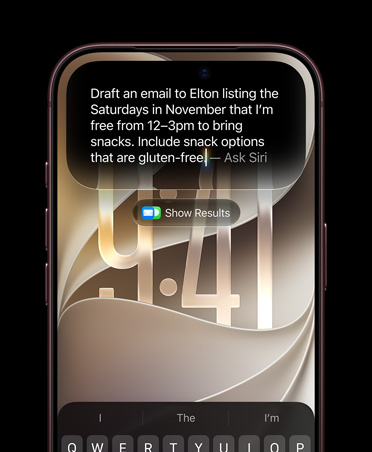
Type or talk naturally with Siri AI to find what you need and get more done.

-
Search and take action with Visual Intelligence, now on even more devices — iPad, Mac, and Apple Vision Pro.3

-
Transform your photos with easy-to-use AI editing tools like Spatial Reframing, Extend, and Clean Up.


-
Write with Siri virtually anywhere you type — compose, edit, and send messages.


-
Just ask Siri.
Powered by Apple Intelligence, Siri AI is your conversational AI assistant with entirely new capabilities. Ask open-ended questions, brainstorm ideas for work or creative projects, and engage in natural, back-and-forth conversations.
-
Siri understands your personal context.
Siri AI can find relevant answers to what you’re looking for just by asking. Search for a photo from years ago, easily locate an email buried in your inbox, or pull up the details from a note you saved.

-
Take action in more apps.
Siri AI can take actions in apps like Messages, Music, Reminders, and more based on what you’re doing in the moment. Quickly edit a message you just sent or add a song you hear in the car to your workout playlist.

-
Tap into broad world knowledge.
Ask about virtually any topic that’s on your mind, from important facts to recipes and travel recommendations. Siri AI can reference information online to give you detailed, up-to-date insights.

-
Introducing the Siri app.
A dedicated app brings together all your conversations in one place, so you can ask a question on your iPhone and pick up where you left off on your iPad. You can also pin conversations for easy access or start a new one.

-
Customize how Siri sounds.
Pick a voice, then customize expressivity and pace until it clicks for you.4

-
Siri AI in CarPlay.
On the road, ask Siri which trailhead your friend suggested and get the answer instantly. Siri in CarPlay keeps you informed without taking your hands off the wheel.5

-
Siri mode in Camera.
Siri mode and Visual Intelligence let you search, ask questions, and take action based on what’s around you with just a tap.

-
New smart actions.
Visual Intelligence makes it easy to split the bill with friends when you get the check, get nutritional information on a dish in front of you, quickly import a card to Apple Wallet, and more.

-
Ask Siri about what’s in front of you.
Get information, take action, and search visually using the content on your screen.

-
Visual Intelligence with Siri on Mac.
Take a screenshot of what’s on your display, like an image or a PDF, and Visual Intelligence lets you search and take action.

-
Visual Intelligence with Siri on iPad.
Ask Siri AI about virtually anything on your display with a screenshot. Just tap the item with your finger or circle it with Apple Pencil to find out more.

-
Visual Intelligence with Siri on Apple Vision Pro.
Simply look at something to learn more about it. You can ask Siri AI about text, images, and even real-world objects as you see them in the moment.

-
Next-level intelligent photo editing.
Reframe a photo after it’s been taken with Spatial Reframing. Expand your shots with the Extend tool. And remove even larger objects with the enhanced Clean Up tool.

-
Reframe your photo even after it’s taken.
Move the viewpoint, adjust the angle, or zoom in as if you were repositioning the camera in the moment with Spatial Reframing.

-
Express more with Image Playground.
Create unique, high-quality images in just about any style, including photorealistic. Modify and transform your images with just a description or using touch for endless possibilities.

-
Image Wand.
Transform rough sketches into images in virtually any style right in Notes.

Available now
-
Write with Siri virtually anywhere you type.
Siri AI can now generate a draft from scratch or provide feedback on what you’ve written. Just describe what you need in your own words. And in Messages and Mail, Siri AI can match your writing style, punctuation, and tone.
Usage limits may apply.