
Merchant listing (Product, Offer) structured data
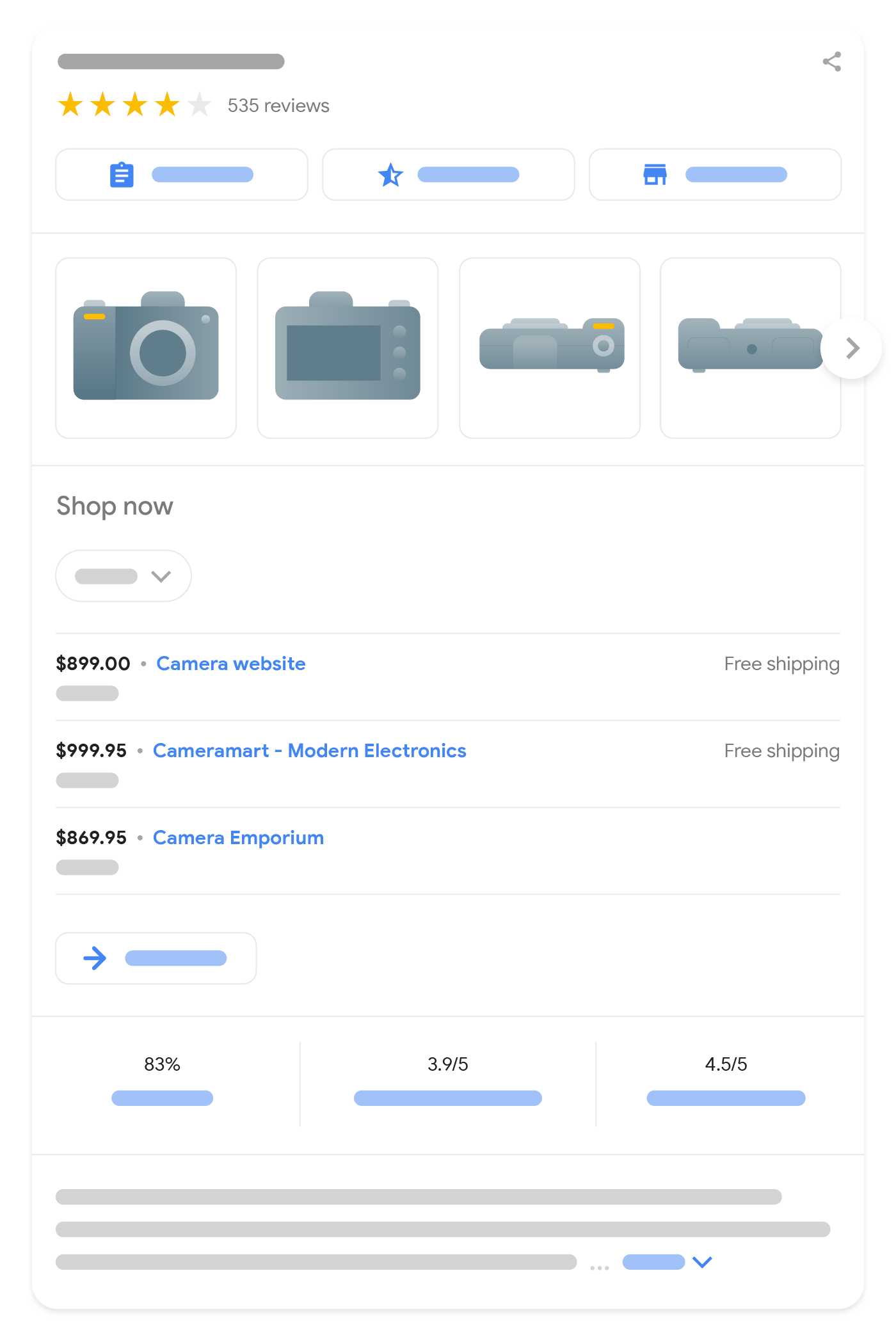
When you add Product markup to your page, it can be eligible for display in merchant
listing experiences on Google Search, including the shopping knowledge panel,
Google Images, popular product results, and product snippets. Merchant listings can
highlight more specific data about a product, such as its price, availability, and shipping and
return information.
This guide focuses on the Product structured data requirements for
merchant listings. If you're not sure which markup to use, read our
intro to Product markup.
How to add structured data
Structured data is a standardized format for providing information about a page and classifying the page content. If you're new to structured data, you can learn more about how structured data works.
Here's an overview of how to build, test, and release structured data.
- Add the required properties. Based on the format you're using, learn where to insert structured data on the page.
- Follow the guidelines.
- Validate your code using the Rich Results Test and fix any critical errors. Consider also fixing any non-critical issues that may be flagged in the tool, as they can help improve the quality of your structured data (however, this isn't necessary to be eligible for rich results).
- Deploy a few pages that include your structured data and use the URL Inspection tool to test how Google sees the page. Be sure that your page is
accessible to Google and not blocked by a robots.txt file, the
noindextag, or login requirements. If the page looks okay, you can ask Google to recrawl your URLs. - To keep Google informed of future changes, we recommend that you submit a sitemap. You can automate this with the Search Console Sitemap API.
Examples
The following examples illustrate how to include structured data on your web pages for different situations.
Product page with an offer
Here's an example of a product page selling a product, with product reviews.
JSON-LD
 <html>
  <head>
    <title>Executive Anvil</title>
    <script type="application/ld+json">
    {
      "@context": "https://schema.org/",
      "@type": "Product",
      "name": "Executive Anvil",
      "image": [
        "https://example.com/photos/1x1/photo.jpg",
        "https://example.com/photos/4x3/photo.jpg",
        "https://example.com/photos/16x9/photo.jpg"
       ],
      "description": "Sleeker than ACME's Classic Anvil, the Executive Anvil is perfect for the business traveler looking for something to drop from a height.",
      "sku": "0446310786",
      "mpn": "925872",
      "brand": {
        "@type": "Brand",
        "name": "ACME"
      },
      "review": {
        "@type": "Review",
        "reviewRating": {
          "@type": "Rating",
          "ratingValue": 4,
          "bestRating": 5
        },
        "author": {
          "@type": "Person",
          "name": "Fred Benson"
        }
      },
      "aggregateRating": {
        "@type": "AggregateRating",
        "ratingValue": 4.4,
        "reviewCount": 89
      },
      "offers": {
        "@type": "Offer",
        "url": "https://example.com/anvil",
        "priceCurrency": "USD",
        "price": 119.99,
        "priceValidUntil": "2024-11-20",
        "itemCondition": "https://schema.org/UsedCondition",
        "availability": "https://schema.org/InStock"
      }
    }
    </script>
  </head>
  <body>
  </body>
</html>
RDFa
 <html>
  <head>
    <title>Executive Anvil</title>
  </head>
  <body>
    <div typeof="schema:Product">
        <div rel="schema:review">
          <div typeof="schema:Review">
            <div rel="schema:reviewRating">
              <div typeof="schema:Rating">
                <div property="schema:ratingValue" content="4"></div>
                <div property="schema:bestRating" content="5"></div>
              </div>
            </div>
            <div rel="schema:author">
              <div typeof="schema:Person">
                <div property="schema:name" content="Fred Benson"></div>
              </div>
            </div>
          </div>
        </div>
        <div rel="schema:image" resource="https://example.com/photos/4x3/photo.jpg"></div>
        <div property="schema:mpn" content="925872"></div>
        <div property="schema:name" content="Executive Anvil"></div>
        <div property="schema:description" content="Sleeker than ACME's Classic Anvil, the Executive Anvil is perfect for the business traveler looking for something to drop from a height."></div>
        <div rel="schema:image" resource="https://example.com/photos/1x1/photo.jpg"></div>
        <div rel="schema:brand">
          <div typeof="schema:Brand">
            <div property="schema:name" content="ACME"></div>
          </div>
        </div>
        <div rel="schema:aggregateRating">
          <div typeof="schema:AggregateRating">
            <div property="schema:reviewCount" content="89"></div>
            <div property="schema:ratingValue" content="4.4"></div>
          </div>
        </div>
        <div rel="schema:offers">
          <div typeof="schema:Offer">
            <div property="schema:price" content="119.99"></div>
            <div property="schema:availability" content="https://schema.org/InStock"></div>
            <div property="schema:priceCurrency" content="USD"></div>
            <div property="schema:priceValidUntil" datatype="xsd:date" content="2024-11-20"></div>
            <div rel="schema:url" resource="https://example.com/anvil"></div>
            <div property="schema:itemCondition" content="https://schema.org/UsedCondition"></div>
          </div>
        </div>
        <div rel="schema:image" resource="https://example.com/photos/16x9/photo.jpg"></div>
        <div property="schema:sku" content="0446310786"></div>
      </div>
  </body>
</html>
Microdata
 <html>
  <head>
    <title>Executive Anvil</title>
  </head>
  <body>
  <div>
    <div itemtype="https://schema.org/Product" itemscope>
      <meta itemprop="mpn" content="925872" />
      <meta itemprop="name" content="Executive Anvil" />
      <link itemprop="image" href="https://example.com/photos/16x9/photo.jpg" />
      <link itemprop="image" href="https://example.com/photos/4x3/photo.jpg" />
      <link itemprop="image" href="https://example.com/photos/1x1/photo.jpg" />
      <meta itemprop="description" content="Sleeker than ACME's Classic Anvil, the Executive Anvil is perfect for the business traveler looking for something to drop from a height." />
      <div itemprop="offers" itemtype="https://schema.org/Offer" itemscope>
        <link itemprop="url" href="https://example.com/anvil" />
        <meta itemprop="availability" content="https://schema.org/InStock" />
        <meta itemprop="priceCurrency" content="USD" />
        <meta itemprop="itemCondition" content="https://schema.org/UsedCondition" />
        <meta itemprop="price" content="119.99" />
        <meta itemprop="priceValidUntil" content="2024-11-20" />
      </div>
      <div itemprop="aggregateRating" itemtype="https://schema.org/AggregateRating" itemscope>
        <meta itemprop="reviewCount" content="89" />
        <meta itemprop="ratingValue" content="4.4" />
      </div>
      <div itemprop="review" itemtype="https://schema.org/Review" itemscope>
        <div itemprop="author" itemtype="https://schema.org/Person" itemscope>
          <meta itemprop="name" content="Fred Benson" />
        </div>
        <div itemprop="reviewRating" itemtype="https://schema.org/Rating" itemscope>
          <meta itemprop="ratingValue" content="4" />
          <meta itemprop="bestRating" content="5" />
        </div>
      </div>
      <meta itemprop="sku" content="0446310786" />
      <div itemprop="brand" itemtype="https://schema.org/Brand" itemscope>
        <meta itemprop="name" content="ACME" />
      </div>
    </div>
  </div>
  </body>
</html>
Pricing
Google recognizes three kinds of prices:
- Active price
- The price at which the product is currently offered.
- Strikethrough price
- During a sale, the higher regular price at which the product is normally offered. It may be displayed as a struck-through price to draw attention to a lowered active price.
- Member price
- The price at which the product is offered to a member of a particular loyalty program.
These prices are encoded using price specifications under the Offer object (with the
exception of the active price, which can also be encoded at the offer level). The respective price
specifications are identified by the price specification properties priceType
and validForMemberTier, which must not be used together:
- Active prices have neither a
priceTypenor avalidForMemberTierproperty. - Strikethrough prices set the
priceTypeproperty toStrikethroughPrice(for a transition period,ListPriceis also allowed) and cannot have avalidForMemberTierproperty. - Member prices are marked with a
validForMemberTierproperty and cannot have apriceTypeproperty.
Price specifications containing both of these properties are ignored.
Active price
Here are two examples of encoding the active price in JSON-LD. The active price can be specified
using the price property as follows:
"offers": {
  "@type": "Offer",
  "price": 10.00,
  "priceCurrency": "USD",
  ...
}
Alternatively, the active price can be specified using the priceSpecification
property.
"offers": {
  "@type": "Offer",
  "priceSpecification": {
    "@type": "UnitPriceSpecification",
    "price": 10.00,
    "priceCurrency": "USD"
  },
  ...
}
Sale pricing
The following example shows a product with a sale price. The current, active price automatically
becomes a sale price when you provide a second price with the original, strikethrough price and
mark it with a priceType property of
value https://schema.org/StrikethroughPrice. Don't mark the active price with
a priceType property.
{
  "@context": "https://schema.org/",
  "@type": "Product",
  "name": "Nice trinket",
  "offers": {
    "@type": "Offer",
    "url": "https://www.example.com/trinket_offer",
    "price": 10.00,
    "priceCurrency": "GBP",
    "priceSpecification": {
      "@type": "UnitPriceSpecification",
      "priceType": "https://schema.org/StrikethroughPrice",
      "price": 15.00,
      "priceCurrency": "GBP"
    }
  }
}
Alternatively, you can use two UnitPriceSpecification objects to specify the sale
price and the strikethrough price:
{
  "@context": "https://schema.org/",
  "@type": "Product",
  "name": "Nice trinket",
  "offers": {
    "@type": "Offer",
    "priceSpecification": [
      {
        "@type": "UnitPriceSpecification",
        "price": 10.00,
        "priceCurrency": "GBP"
      },
      {
        "@type": "UnitPriceSpecification",
        "priceType": "https://schema.org/StrikethroughPrice",
        "price": 15.00,
        "priceCurrency": "GBP"
      }
    ]
  }
}
Sale duration
To specify the period when a sale price is active, use the following schema.org properties in ISO 8601 format (for example, 2025-12-31T23:59:59+01:00):
- Start date and time: Use the
validFromproperty. - End date and time: Use either the
validThroughproperty or thepriceValidUntilproperty.
Best practices:
- Provide both a start and an end date/time to clearly define the sale period.
- Ensure the start date/time (from the
validFromproperty) is earlier than or equal to the end date/time (from thevalidThroughproperty or thepriceValidUntilproperty). - We recommend including the time and timezone in the ISO 8601 format for accuracy in Google systems.
Where to place the properties:
-
On the
Offernode: You can add thevalidFromproperty and (thevalidThroughproperty or thepriceValidUntilproperty) directly to theOffernode. These dates apply when thepriceproperty on theOffernode represents the current active sale price. -
On a
PriceSpecificationnode: If the sale price is defined within aPriceSpecificationnode (typically one without thepriceTypeproperty when aStrikethroughPricevalue is also present), add thevalidFromproperty and thevalidThroughproperty to that specificPriceSpecificationnode. Note that thepriceValidUntilproperty isn't applicable to thePriceSpecificationtype.
The following example shows a product with a sale price. The duration properties are added to the
Offer node, as the price property on the Offer node holds the sale price.
{
  "@context": "https://schema.org/",
  "@type": "Product",
  "name": "Nice trinket",
  "offers": {
    "@type": "Offer",
    "url": "https://www.example.com/trinket_offer",
    "price": 10.00,
    "priceCurrency": "GBP",
    "validFrom": "2025-11-20T08:00:00+00:00",
    "priceValidUntil": "2025-11-30T23:59:59+00:00",
    "priceSpecification": {
      "@type": "UnitPriceSpecification",
      "priceType": "https://schema.org/StrikethroughPrice",
      "price": 15.00,
      "priceCurrency": "GBP"
    }
  }
}
Alternatively, you can use two UnitPriceSpecification objects to specify the sale
price and the strikethrough price. The duration properties are added to the
UnitPriceSpecification object that contains the sale price:
{
  "@context": "https://schema.org/",
  "@type": "Product",
  "name": "Nice trinket",
  "offers": {
    "@type": "Offer",
    "priceSpecification": [
      {
        "@type": "UnitPriceSpecification",
        "price": 10.00,
        "priceCurrency": "GBP",
        "validFrom": "2025-11-20T08:00:00+00:00",
        "validThrough": "2025-11-30T23:59:59+00:00"
      },
      {
        "@type": "UnitPriceSpecification",
        "priceType": "https://schema.org/StrikethroughPrice",
        "price": 15.00,
        "priceCurrency": "GBP"
      }
    ]
  }
}
Member prices
Here are four examples of encoding a member price. In the first example, the active price is
specified with the price property at the offer level, and the member price is given
in a price specification marked with
the validForMemberTier property:
"offers": {
  "@type": "Offer",
  "url": "https://www.example.com/trinket_offer",
  "price": 10.00,
  "priceCurrency": "GBP",
  "priceSpecification": {
    "@type": "UnitPriceSpecification",
    "price": 8.00,
    "priceCurrency": "GBP",
    "validForMemberTier": {
      "@type": "MemberProgramTier",
      "@id": "https://www.example.com/com/members#tier_gold"
    }
  }
}
The second example shows both the active price and the member price encoded with price specifications:
"offers": {
  "@type": "Offer",
  "url": "https://www.example.com/trinket_offer",
  "priceSpecification": [
    {
      "@type": "UnitPriceSpecification",
      "price": 10.00,
      "priceCurrency": "GBP"
    },
    {
      "@type": "UnitPriceSpecification",
      "price": 8.00,
      "priceCurrency": "GBP",
      "validForMemberTier": {
        "@type": "MemberProgramTier",
        "@id": "https://www.example.com/com/members#tier_gold"
      }
    }
  ]
}
The third example demonstrates how to encode a sale price, a strikethrough price, and member prices for several loyalty program tiers in a single offer:
"offers": {
  "@type": "Offer",
  "url": "https://www.example.com/trinket_offer",
  "priceSpecification": [
    {
      "@type": "UnitPriceSpecification",
      "price": 9.00,
      "priceCurrency": "GBP"
    },
    {
      "@type": "UnitPriceSpecification",
      "priceType": "https://schema.org/StrikethroughPrice",
      "price": 10.00,
      "priceCurrency": "GBP"
    },
    {
      "@type": "UnitPriceSpecification",
      "price": 8.00,
      "priceCurrency": "GBP",
      "validForMemberTier": {
        "@type": "MemberProgramTier",
        "@id": "https://www.example.com/com/members#tier_silver"
      }
    },
    {
      "@type": "UnitPriceSpecification",
      "price": 7.00,
      "priceCurrency": "GBP",
      "validForMemberTier": [
        {
          "@type": "MemberProgramTier",
          "@id": "https://www.example.com/com/members#tier_gold"
        },
        {
          "@type": "MemberProgramTier",
          "@id": "https://www.example.com/com/members#tier_platinum"
        }
      ]
    }
  ]
}
The active price could also be encoded at the offer level, as shown in the first example.
In the fourth example, the member price specification shows membership points instead of a member price:
"offers": {
  "@type": "Offer",
  "url": "https://www.example.com/trinket_offer",
  "price": 10.00,
  "priceCurrency": "GBP",
  "priceSpecification": {
    "@type": "UnitPriceSpecification",
    "membershipPointsEarned": 20,
    "validForMemberTier": {
      "@type": "MemberProgramTier",
      "@id": "https://www.example.com/com/members#tier_gold"
    }
  }
}
Pricing with unit pricing measures
Here is an example of how to specify a price for 200 ml of a product that is customarily sold in multiples of 100 ml. For example, if you were selling a 200 ml bottle of perfume, you could show customers how much your perfume costs per 100 ml. The following example shows that the perfume costs €100 per 100 ml, which means a 200 ml bottle of perfume would cost €200. This form of pricing is particularly important in the EU, New Zealand, and Australia for products sold by volume, length, or weight.
When the unit pricing measure
and unit pricing base measure
are present, specify the active price inside
a UnitPriceSpecification and use the
referenceQuantity property to provide the unit
pricing.
"offers": {
  "@type": "Offer",
  "url": "https://www.example.com/perfume_offer",
  "priceSpecification": {
    "@type": "UnitPriceSpecification",
    "price": 200.00,
    "priceCurrency": "EUR",
    "referenceQuantity": {
      "@type": "QuantitativeValue",
      "value": "200",
      "unitCode": "ML",
      "valueReference": {
        "@type": "QuantitativeValue",
        "value": "100",
        "unitCode": "ML"
      }
    }
  }
}
Shipping details
Here's an example of a product page with shipping details. This example would result in a shipping rate of $3.49 for all users that live in the US. For more examples, review the Shipping section.
JSON-LD
 <html>
  <head>
    <title>Nice trinket</title>
    <script type="application/ld+json">
    {
      "@context": "https://schema.org/",
      "@type": "Product",
      "sku": "trinket-12345",
      "gtin14": "00012345600012",
      "image": [
        "https://example.com/photos/16x9/trinket.jpg",
        "https://example.com/photos/4x3/trinket.jpg",
        "https://example.com/photos/1x1/trinket.jpg"
      ],
      "name": "Nice trinket",
      "description": "Trinket with clean lines",
      "brand": {
        "@type": "Brand",
        "name": "MyBrand"
      },
      "offers": {
        "@type": "Offer",
        "url": "https://www.example.com/trinket_offer",
        "itemCondition": "https://schema.org/NewCondition",
        "availability": "https://schema.org/InStock",
        "price": 39.99,
        "priceCurrency": "USD",
        "priceValidUntil": "2024-11-20",
        "shippingDetails": {
          "@type": "OfferShippingDetails",
          "shippingRate": {
            "@type": "MonetaryAmount",
            "value": 3.49,
            "currency": "USD"
          },
          "shippingDestination": {
            "@type": "DefinedRegion",
            "addressCountry": "US"
          },
          "deliveryTime": {
            "@type": "ShippingDeliveryTime",
            "handlingTime": {
              "@type": "QuantitativeValue",
              "minValue": 0,
              "maxValue": 1,
              "unitCode": "DAY"
            },
            "transitTime": {
              "@type": "QuantitativeValue",
              "minValue": 1,
              "maxValue": 5,
              "unitCode": "DAY"
            }
          }
        }
      },
      "review": {
        "@type": "Review",
          "reviewRating": {
            "@type": "Rating",
            "ratingValue": 4,
            "bestRating": 5
          },
          "author": {
            "@type": "Person",
            "name": "Fred Benson"
          }
        },
        "aggregateRating": {
          "@type": "AggregateRating",
          "ratingValue": 4.4,
          "reviewCount": 89
        }
      }
    </script>
  </head>
  <body>
  </body>
</html>
RDFa
 <html>
  <head>
    <title>Nice trinket</title>
  </head>
  <body>
    <div typeof="schema:Product">
      <div property="schema:sku" content="trinket-12345"></div>
      <div property="schema:gtin14" content="00012345600012"></div>
      <div property="schema:name" content="Nice trinket"></div>
      <div rel="schema:image" resource="https://example.com/photos/16x9/trinket.jpg"></div>
      <div rel="schema:image" resource="https://example.com/photos/4x3/trinket.jpg"></div>
      <div rel="schema:image" resource="https://example.com/photos/1x1/trinket.jpg"></div>
      <div property="schema:description" content="Trinket with clean lines"></div>
      <div rel="schema:brand">
        <div typeof="schema:Brand">
          <div property="schema:name" content="MyBrand"></div>
        </div>
      </div>
      <div rel="schema:offers">
        <div typeof="schema:Offer">
          <div rel="schema:url" resource="https://example.com/trinket_offer"></div>
          <div property="schema:itemCondition" content="https://schema.org/NewCondition"></div>
          <div property="schema:availability" content="https://schema.org/InStock"></div>
          <div property="schema:price" content="39.99"></div>
          <div property="schema:priceCurrency" content="USD"></div>
          <div property="schema:priceValidUntil" datatype="xsd:date" content="2024-11-20"></div>
          <div rel="schema:shippingDetails">
            <div typeof="schema:OfferShippingDetails">
              <div rel="schema:shippingRate">
                <div typeof="schema:MonetaryAmount">
                  <div property="schema:value" content="3.49"></div>
                  <div property="schema:currency" content="USD"></div>
                </div>
              </div>
              <div rel="schema:shippingDestination">
                <div typeof="schema:DefinedRegion">
                  <div property="schema:addressCountry" content="US"></div>
                </div>
              </div>
              <div rel="schema:deliveryTime">
                <div typeof="schema:ShippingDeliveryTime">
                  <div rel="schema:handlingTime">
                    <div typeof="schema:QuantitativeValue">
                      <div property="schema:minValue" content="0"></div>
                      <div property="schema:maxValue" content="1"></div>
                      <div property="schema:unitCode" content="DAY"></div>
                    </div>
                  </div>
                  <div rel="schema:transitTime">
                    <div typeof="schema:QuantitativeValue">
                      <div property="schema:minValue" content="1"></div>
                      <div property="schema:maxValue" content="5"></div>
                      <div property="schema:unitCode" content="DAY"></div>
                    </div>
                  </div>
                </div>
              </div>
            </div>
          </div>
        </div>
      </div>
      <div rel="schema:review">
        <div typeof="schema:Review">
          <div rel="schema:reviewRating">
            <div typeof="schema:Rating">
              <div property="schema:ratingValue" content="4"></div>
              <div property="schema:bestRating" content="5"></div>
            </div>
          </div>
          <div rel="schema:author">
            <div typeof="schema:Person">
              <div property="schema:name" content="Fred Benson"></div>
            </div>
          </div>
        </div>
      </div>
      <div rel="schema:aggregateRating">
        <div typeof="schema:AggregateRating">
          <div property="schema:reviewCount" content="89"></div>
          <div property="schema:ratingValue" content="4.4"></div>
        </div>
      </div>
    </div>
  </body>
</html>
Microdata
 <html>
  <head>
    <title>Nice trinket</title>
  </head>
  <body>
  <div>
    <div itemtype="https://schema.org/Product" itemscope>
      <meta itemprop="sku" content="trinket-12345" />
      <meta itemprop="gtin14" content="00012345600012" />
      <meta itemprop="name" content="Nice trinket" />
      <link itemprop="image" href="https://example.com/photos/16x9/trinket.jpg" />
      <link itemprop="image" href="https://example.com/photos/4x3/trinket.jpg" />
      <link itemprop="image" href="https://example.com/photos/1x1/trinket.jpg" />
      <meta itemprop="description" content="Trinket with clean lines" />
      <div itemprop="brand" itemtype="https://schema.org/Brand" itemscope>
        <meta itemprop="name" content="MyBrand" />
      </div>
      <div itemprop="offers" itemtype="https://schema.org/Offer" itemscope>
        <link itemprop="url" href="https://www.example.com/trinket_offer" />
        <meta itemprop="itemCondition" content="https://schema.org/NewCondition" />
        <meta itemprop="availability" content="https://schema.org/InStock" />
        <meta itemprop="price" content="39.99" />
        <meta itemprop="priceCurrency" content="USD" />
        <meta itemprop="priceValidUntil" content="2024-11-20" />
        <div itemprop="shippingDetails" itemtype="https://schema.org/OfferShippingDetails" itemscope>
          <div itemprop="shippingRate" itemtype="https://schema.org/MonetaryAmount" itemscope>
            <meta itemprop="value" content="3.49" />
            <meta itemprop="currency" content="USD" />
          </div>
          <div itemprop="shippingDestination" itemtype="https://schema.org/DefinedRegion" itemscope>
            <meta itemprop="addressCountry" content="US" />
          </div>
          <div itemprop="deliveryTime" itemtype="https://schema.org/ShippingDeliveryTime" itemscope>
            <div itemprop="handlingTime" itemtype="https://schema.org/QuantitativeValue" itemscope>
              <meta itemprop="minValue" content="0" />
              <meta itemprop="maxValue" content="1" />
              <meta itemprop="unitCode" content="DAY" />
            </div>
            <div itemprop="transitTime" itemtype="https://schema.org/QuantitativeValue" itemscope>
              <meta itemprop="minValue" content="1" />
              <meta itemprop="maxValue" content="5" />
              <meta itemprop="unitCode" content="DAY" />
            </div>
          </div>
        </div>
      </div>
      <div itemprop="review" itemtype="https://schema.org/Review" itemscope>
        <div itemprop="author" itemtype="https://schema.org/Person" itemscope>
          <meta itemprop="name" content="Fred Benson" />
        </div>
        <div itemprop="reviewRating" itemtype="https://schema.org/Rating" itemscope>
          <meta itemprop="ratingValue" content="4" />
          <meta itemprop="bestRating" content="5" />
        </div>
      </div>
      <div itemprop="aggregateRating" itemtype="https://schema.org/AggregateRating" itemscope>
        <meta itemprop="reviewCount" content="89" />
        <meta itemprop="ratingValue" content="4.4" />
      </div>
    </div>
  </div>
  </body>
</html>
Free shipping
Here's an example of providing free shipping to buyers in the US state of New York.
"shippingDetails": {
  "@type": "OfferShippingDetails",
  "shippingRate": {
    "@type": "MonetaryAmount",
    "value": "0",
    "currency": "USD"
  },
  "shippingDestination": [
    {
      "@type": "DefinedRegion",
      "addressCountry": "US",
      "addressRegion": ["NY"]
    }
  ]
}
Return details
Here is an example of a product page with return details. The markup matches a return policy that requires products sold in Switzerland to be returned by mail within 60 days and charges a return fee of 3.49 Swiss Francs.
    {
      "@context": "https://schema.org/",
      "@type": "Product",
      "sku": "trinket-12345",
      "gtin14": "00012345600012",
      "image": [
        "https://example.com/photos/16x9/trinket.jpg",
        "https://example.com/photos/4x3/trinket.jpg",
        "https://example.com/photos/1x1/trinket.jpg"
      ],
      "name": "Nice trinket",
      "description": "Trinket with clean lines",
      "brand": {
        "@type": "Brand",
        "name": "MyBrand"
      },
      "offers": {
        "@type": "Offer",
        "url": "https://www.example.com/trinket_offer",
        "itemCondition": "https://schema.org/NewCondition",
        "availability": "https://schema.org/InStock",
        "priceSpecification": {
          "@type": "PriceSpecification",
          "price": 39.99,
          "priceCurrency": "CHF"
        },
        "hasMerchantReturnPolicy": {
          "@type": "MerchantReturnPolicy",
          "applicableCountry": "CH",
          "returnPolicyCategory": "https://schema.org/MerchantReturnFiniteReturnWindow",
          "merchantReturnDays": 60,
          "returnMethod": "https://schema.org/ReturnByMail",
          "returnFees": "https://schema.org/ReturnShippingFees",
          "returnShippingFeesAmount": {
            "@type": "MonetaryAmount",
            "value": 3.49,
            "currency": "CHF"
          }
        }
      }
    }
Certifications
The following examples illustrate how to specify certification information using structured data. The first example specifies the German CO2 emissions class "D" for a vehicle.
{
  "@context": "https://schema.org/",
  "@type": "Product",
  "sku": "1234-5678",
  "image": "https://www.example.com/vehicle.jpg",
  "name": "Big Car",
  "description": "Passenger vehicle with combustion engine",
  "gtin14": "00012345600012",
  "mpn": "WH1234",
  "brand": {
    "@type": "Brand",
    "name": "ExampleCarBrand"
  },
  "hasCertification": {
    "@type": "Certification",
    "issuedBy": {
      "@type": "Organization",
      "name": "BMWK"
    },
    "name": "Vehicle_CO2_Class",
    "certificationRating": {
      "@type": "Rating",
      "ratingValue": "D"
    }
  },
  "offers": {
    "@type": "Offer",
    "url": "https://www.example.com/vehicle",
    "itemCondition": "https://schema.org/NewCondition",
    "availability": "https://schema.org/InStock",
    "price": 17999.00,
    "priceCurrency": "EUR"
  }
}
The second example specifies an EPREL energy efficiency label for an LED:
{
  "@context": "https://schema.org/",
  "@type": "Product",
  "sku": "1234-5678",
  "image": "https://www.example.com/led.jpg",
  "name": "LED",
  "description": "Dimmable LED",
  "gtin14": "00012345600012",
  "mpn": "WH1234",
  "brand": {
    "@type": "Brand",
    "name": "ExampleLightingBrand"
  },
  "hasCertification": {
    "@type": "Certification",
    "issuedBy": {
      "@type": "Organization",
      "name": "European_Commission"
    },
    "name": "EPREL",
    "certificationIdentification": "123456"
  },
  "offers": {
    "@type": "Offer",
    "url": "https://www.example.com/led",
    "itemCondition": "https://schema.org/NewCondition",
    "availability": "https://schema.org/InStock",
    "price": 2.30,
    "priceCurrency": "EUR"
  }
}