

This document describes how you can use customer-managed encryption keys (CMEK) in Cloud Key Management Service (Cloud KMS) for your Memorystore for Valkey instances. The document also outlines which data is encrypted in persistent storage and how your instances behave during key lifecycle events.
CMEK lets you control the cryptographic keys that protect your stored data. By managing your own keys in Cloud KMS, you gain greater control over key access, rotation, and usage, which helps you meet strict compliance and regulatory requirements.
Implementing CMEK provides an additional layer of security and control over your persistent data, such as backups and persistence files. You can enable CMEK only on new instances. You can't apply CMEK to existing instances.
Who should use CMEK?
CMEK is intended for organizations that have sensitive or regulated data, and require control over their own encryption keys. For more information about whether to use CMEK to encrypt this data, see Decide whether to use CMEK.
Customer-managed encryption
CMEK lets you use your cryptographic keys to protect stored data in Memorystore for Valkey instances. To encrypt this data, Memorystore for Valkey uses Google-managed data encryption keys (DEKs) and customer-managed key encryption keys (KEKs).
You can have the following levels of encryption:
- DEK encryption: DEKs encrypt data in Memorystore for Valkey.
- KEK encryption: KEKs encrypt DEKs.
Memorystore for Valkey uses KEKs to encrypt DEKs, and it uses DEKs to encrypt the stored data. If you use CMEK, then you can manage the KEKs that encrypt the DEKs in your instance.
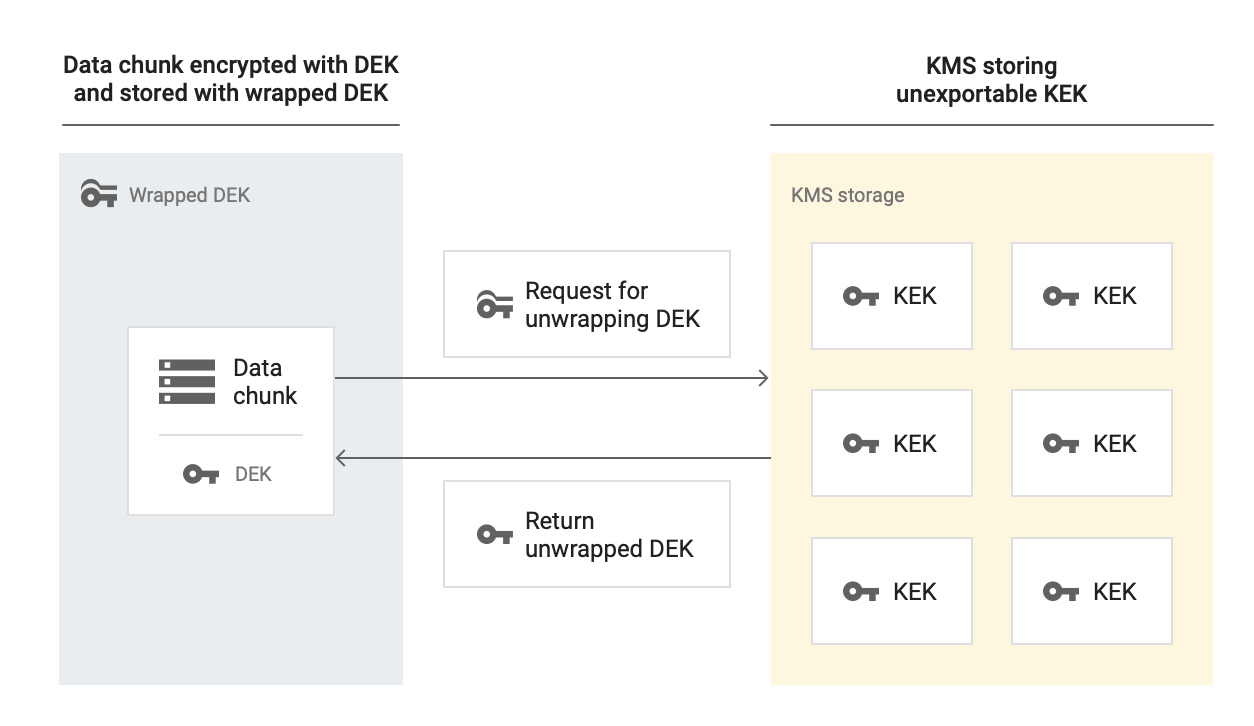
The following diagram shows how an instance uses CMEK to encrypt data. Data that's uploaded to Google's storage infrastructure is chunked, and each chunk is encrypted with its own DEK. Cloud KMS provides the KEK to encrypt the DEKs, and Google's storage infrastructure distributes both the encrypted data chunks and the encrypted DEKs across the system.

The following diagram shows how Memorystore for Valkey decrypts data that's encrypted with CMEK. To access this encrypted data, Memorystore for Valkey sends a request to Cloud KMS, which manages the KEK, to decrypt the DEK. Cloud KMS then returns the decrypted DEK, which the instance uses to decrypt the stored data.
Which data is encrypted using CMEK?
CMEK encrypts the following types of customer data that are stored in persistent storage:
- Backups: backups let you recover your data to a point in time, as well as export and analyze it. Backups are also useful for disaster recovery, data migration, data sharing, and compliance scenarios.
- Persistence:
Memorystore for Valkey supports two types of persistence:
- RDB persistence: save snapshots of your data on durable storage.
- AOF persistence: store data durably by recording every write command to a log file called the Append-Only File (AOF). If a system failure or restart occurs, then the server replays AOF file commands sequentially to restore your data.
- Metadata related to security features like basic token-based authentication and in-transit encryption. For more information, see Secure access to your instances by using basic token-based authentication and About in-transit encryption.
CMEK components
The following sections describe the requirements and behaviors of the service accounts, cryptographic keys, key versions, and organization policies that make up your CMEK architecture.
Service accounts
To create a CMEK-enabled instance, you must grant the
roles/cloudkms.cryptoKeyEncrypterDecrypter role to the Memorystore for Valkey
service account that uses the following format:
service-PROJECT_NUMBER@gcp-sa-memorystore.iam.gserviceaccount.com
Granting this permission lets the service account request key access from Cloud KMS.
Keys
In Cloud KMS, you need to create a key ring, and then create a cryptographic key that uses a symmetric encryption algorithm. When you create a Memorystore for Valkey instance, you select this key to encrypt the instance. You can create one project for both your keys and instances, or different projects for each of them.
CMEK is available in all Memorystore for Valkey instance locations. You must create the key ring and key in the same region where you want to create the instance. For a multi-region instance, you must set the key ring and key to the same location as the instance. If the regions or locations don't match, then a request for creating the instance fails.
For the resource ID of the key, CMEK uses the following format:
projects/CMEK_ENABLED_PROJECT/locations/REGION/keyRings/KEY_RING_NAME/cryptoKeys/KEY_NAME
For more information about finding the resource IDs of existing keys, see Getting a Cloud KMS resource ID.
External keys
As part of your CMEK strategy, you can use external keys. To do this, use Cloud External Key Manager (Cloud EKM) to encrypt data within Google Cloud by using external keys that you manage.
When you use a Cloud EKM key, Google has no control over the availability of your externally managed keys. If a key isn't available when you create your instance, then Memorystore for Valkey doesn't create the instance. Furthermore, if the external key becomes unavailable at any point after you create the instance, then Memorystore for Valkey deactivates backups and persistence, but regular in-memory caching operations continue to serve traffic.
For more considerations about using external keys, see Considerations.
Key versions
Cloud KMS stores the cryptographic key material that you use to encrypt and decrypt your data in a key version. A single key can contain multiple key versions. Whenever you rotate a key, you create a key version.
The following sections describe how your instances and their protected data behave during key lifecycle events, such as disabling, destroying, rotating, enabling, or restoring key versions. The sections also explain the impact of revoking access to or replacing a Cloud KMS key, and provide guidance on manually re-encrypting data.
Disabling or destroying a CMEK key version
You might have situations where you want to make data that's encrypted with CMEK permanently inaccessible, such as when you're remediating a data spill. To achieve this high-assurance data destruction (also known as crypto-shredding), you destroy the key version. For more information about destroying key versions, see Destroy and restore key versions.