

-
1. Úvod
- 1.1 Správa verzí
- 1.2 Stručná historie systému Git
- 1.3 Základy systému Git
- 1.4 Příkazový řádek
- 1.5 Instalace systému Git
- 1.6 První nastavení systému Git
- 1.7 Získání nápovědy
- 1.8 Shrnutí
-
2. Základy práce se systémem Git
-
3. Větve v systému Git
- 3.1 Větve v kostce
- 3.2 Základy větvení a slučování
- 3.3 Správa větví
- 3.4 Postupy při práci s větvemi
- 3.5 Vzdálené větve
- 3.6 Přeskládání
- 3.7 Shrnutí
-
4. Git na serveru
- 4.1 Protokoly
- 4.2 Zprovoznění Gitu na serveru
- 4.3 Generování veřejného klíče SSH
- 4.4 Nastavení serveru
- 4.5 Démon Git
- 4.6 Chytrý HTTP
- 4.7 GitWeb
- 4.8 GitLab
- 4.9 Možnosti hostování u třetí strany
- 4.10 Shrnutí
-
5. Distribuovaný Git
- 5.1 Distribuované pracovní postupy
- 5.2 Přispívání do projektu
- 5.3 Správa projektu
- 5.4 Shrnutí
-
6. GitHub
-
7. Git Tools
- 7.1 Revision Selection
- 7.2 Interactive Staging
- 7.3 Stashing and Cleaning
- 7.4 Signing Your Work
- 7.5 Searching
- 7.6 Rewriting History
- 7.7 Reset Demystified
- 7.8 Advanced Merging
- 7.9 Rerere
- 7.10 Ladění v systému Git
- 7.11 Submodules
- 7.12 Bundling
- 7.13 Replace
- 7.14 Credential Storage
- 7.15 Shrnutí
-
8. Customizing Git
- 8.1 Git Configuration
- 8.2 Atributy Git
- 8.3 Git Hooks
- 8.4 An Example Git-Enforced Policy
- 8.5 Shrnutí
-
9. Git a ostatní systémy
- 9.1 Git as a Client
- 9.2 Migrating to Git
- 9.3 Shrnutí
-
10. Git Internals
- 10.1 Plumbing and Porcelain
- 10.2 Git Objects
- 10.3 Git References
- 10.4 Balíčkové soubory
- 10.5 The Refspec
- 10.6 Přenosové protokoly
- 10.7 Správa a obnova dat
- 10.8 Environment Variables
- 10.9 Shrnutí
-
A1. Appendix A: Git in Other Environments
- A1.1 Graphical Interfaces
- A1.2 Git in Visual Studio
- A1.3 Git in Eclipse
- A1.4 Git in Bash
- A1.5 Git in Zsh
- A1.6 Git in Powershell
- A1.7 Shrnutí
-
A2. Appendix B: Embedding Git in your Applications
- A2.1 Command-line Git
- A2.2 Libgit2
- A2.3 JGit
-
A3. Appendix C: Git Commands
- A3.1 Setup and Config
- A3.2 Getting and Creating Projects
- A3.3 Basic Snapshotting
- A3.4 Branching and Merging
- A3.5 Sharing and Updating Projects
- A3.6 Inspection and Comparison
- A3.7 Debugging
- A3.8 Patching
- A3.9 Email
- A3.10 External Systems
- A3.11 Administration
- A3.12 Plumbing Commands
6.5 GitHub - Scripting GitHub
Scripting GitHub
So now we’ve covered all of the major features and workflows of GitHub, but any large group or project will have customizations they may want to make or external services they may want to integrate.
Luckily for us, GitHub is really quite hackable in many ways. In this section we’ll cover how to use the GitHub hooks system and its API to make GitHub work how we want it to.
Hooks
The Hooks and Services section of GitHub repository administration is the easiest way to have GitHub interact with external systems.
Services
First we’ll take a look at Services. Both the Hooks and Services integrations can be found in the Settings section of your repository, where we previously looked at adding Collaborators and changing the default branch of your project. Under the “Webhooks and Services” tab you will see something like Services and Hooks configuration section..
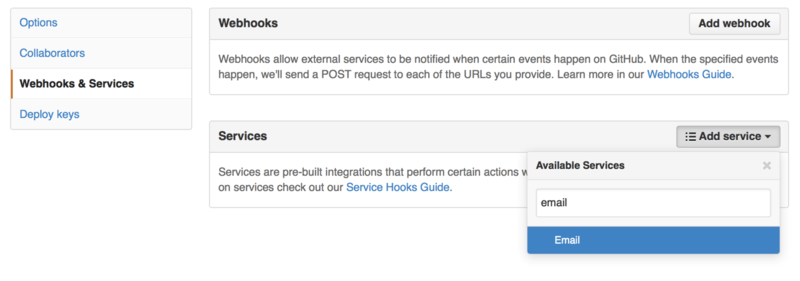
There are dozens of services you can choose from, most of them integrations into other commercial and open source systems. Most of them are for Continuous Integration services, bug and issue trackers, chat room systems and documentation systems. We’ll walk through setting up a very simple one, the Email hook. If you choose “email” from the “Add Service” dropdown, you’ll get a configuration screen like Email service configuration..

In this case, if we hit the “Add service” button, the email address we specified will get an email every time someone pushes to the repository. Services can listen for lots of different types of events, but most only listen for push events and then do something with that data.
If there is a system you are using that you would like to integrate with GitHub, you should check here to see if there is an existing service integration available. For example, if you’re using Jenkins to run tests on your codebase, you can enable the Jenkins builtin service integration to kick off a test run every time someone pushes to your repository.
Zásuvné moduly
If you need something more specific or you want to integrate with a service or site that is not included in this list, you can instead use the more generic hooks system. GitHub repository hooks are pretty simple. You specify a URL and GitHub will post an HTTP payload to that URL on any event you want.
Generally the way this works is you can setup a small web service to listen for a GitHub hook payload and then do something with the data when it is received.
To enable a hook, you click the “Add webhook” button in Services and Hooks configuration section.. This will bring you to a page that looks like Web hook configuration..

The configuration for a web hook is pretty simple.
In most cases you simply enter a URL and a secret key and hit “Add webhook”.
There are a few options for which events you want GitHub to send you a payload for — the default is to only get a payload for the push event, when someone pushes new code to any branch of your repository.
Let’s see a small example of a web service you may set up to handle a web hook. We’ll use the Ruby web framework Sinatra since it’s fairly concise and you should be able to easily see what we’re doing.
Let’s say we want to get an email if a specific person pushes to a specific branch of our project modifying a specific file. We could fairly easily do that with code like this: