The open-source thread-plane for Angular agents.




Threadplane is the open-source thread-plane for Angular agents. Chat, durable
threads, persistence, human approvals, tool progress, subagents, and generative UI — built on
Angular Signals and dependency injection, for Angular 20–22. Your backend stays
where it is: Threadplane adapts a LangGraph or AG-UI agent into a runtime-neutral
Agent contract that the UI consumes, and renders generated UI with the design
system components you already own.
MIT · Angular 20–22 · no account, no cloud
Experimental native React previews are available through the docs' Example UI
selector. The AG-UI JSON Render preview
uses the existing airline agent, six authored read-only views and native shared
state. These React packages remain private source builds; from a checkout, run
npx nx build cockpit-ag-ui-json-render-react and the matching npx nx e2e target.
npm install @threadplane/chat @threadplane/langgraph @langchain/core @langchain/langgraph-sdk markedTalking to an AG-UI endpoint instead:
npm install @threadplane/chat @threadplane/ag-ui @ag-ui/client @ag-ui/core markedPeer dependencies:
@angular/core              ^20.0.0 || ^21.0.0 || ^22.0.0   # every Angular package here
marked                     ^15.0.0 || ^16.0.0              # @threadplane/chat
rxjs                       ~7.8.0                          # @threadplane/chat and both adapters
@langchain/core            ^1.1.33                         # @threadplane/langgraph
@langchain/langgraph-sdk   ^1.7.4                          # @threadplane/langgraph
@ag-ui/client              ^1.0.1                          # @threadplane/ag-ui
@ag-ui/core                ^1.0.1                          # @threadplane/ag-ui
Each package README lists that package's full peer set.
Start with the fake agent. It streams a canned reply in the browser, so the UI can be built and tested before a server, a graph, or an API key exists.
// app.config.ts — no server, no LLM, deterministic output
import { ApplicationConfig } from '@angular/core';
import { provideFakeAgent } from '@threadplane/langgraph';

export const appConfig: ApplicationConfig = {
  providers: [
    provideFakeAgent({ tokens: ['Hello', ' from', ' Threadplane'] }),
  ],
};
// support-agent.component.ts
import { Component } from '@angular/core';
import { injectAgent } from '@threadplane/langgraph';
import { ChatComponent } from '@threadplane/chat';
@Component({
imports: [ChatComponent],
template: `<chat [agent]="agent" />`,
})
export class SupportAgentComponent {
protected readonly agent = injectAgent();
}agent.messages() and agent.status() are Angular Signals. Bind them directly
in a template — no subscriptions, no async pipe, no zone.js required. The same
fake agent is what tests run against: swap the transport, never the component.
Walkthrough: Try without a backend.
When the UI works, point it at a real runtime. Only the provider changes — the
component above is untouched, because @threadplane/chat consumes the
runtime-neutral Agent contract rather than any adapter type.
// LangGraph Platform, or a local `langgraph dev` server
import { provideAgent } from '@threadplane/langgraph';

provideAgent({ apiUrl: 'http://localhost:2024', assistantId: 'agent' });
// Any AG-UI-compatible endpoint
import { provideAgent } from '@threadplane/ag-ui';
provideAgent({ url: 'http://localhost:8000/agent' });Which one to pick: Choosing an adapter.
- demo.threadplane.ai — the LangGraph demo: streaming, durable threads, interrupts, subagents, and generative UI.
- ag-ui.threadplane.ai — the same chat surface over an AG-UI backend.
- Generative UI, live in the docs.
Published packages follow a patch-only 0.0.x release policy: no minor or major
bump silently changes a lockfile.
| Package | Purpose | License |
|---|---|---|
@threadplane/chat |
The Angular agent chat surface: <chat>, headless primitives, opinionated compositions, interrupts, subagents, generative UI |
MIT |
@threadplane/langgraph |
LangGraph adapter; provideAgent() / injectAgent() expose a LangGraph run as Angular Signals |
MIT |
@threadplane/ag-ui |
AG-UI adapter; bridges any @ag-ui/client-compatible backend into the same chat surface |
MIT |
@threadplane/render |
@json-render/core-backed Angular render engine that maps JSON specs to your own components |
MIT |
@threadplane/a2ui |
A2UI protocol types, streaming parser, and dynamic-value resolver; pure TypeScript, no Angular dependency | MIT |
@threadplane/middleware |
Backend middleware for client-declared tools; the /langgraph entrypoint targets LangGraph.js |
MIT |
@threadplane/telemetry |
Explicit Node and browser capture helpers for applications that choose to send events | MIT |
Generated UI renders through a registry you control:
import { provideViews, views } from '@threadplane/render';

provideViews(views({ KpiCard: KpiCardComponent, DisruptionsTable: DisruptionsTableComponent }));
An agent can render those components and nothing else, so generative UI stays inside your design system.
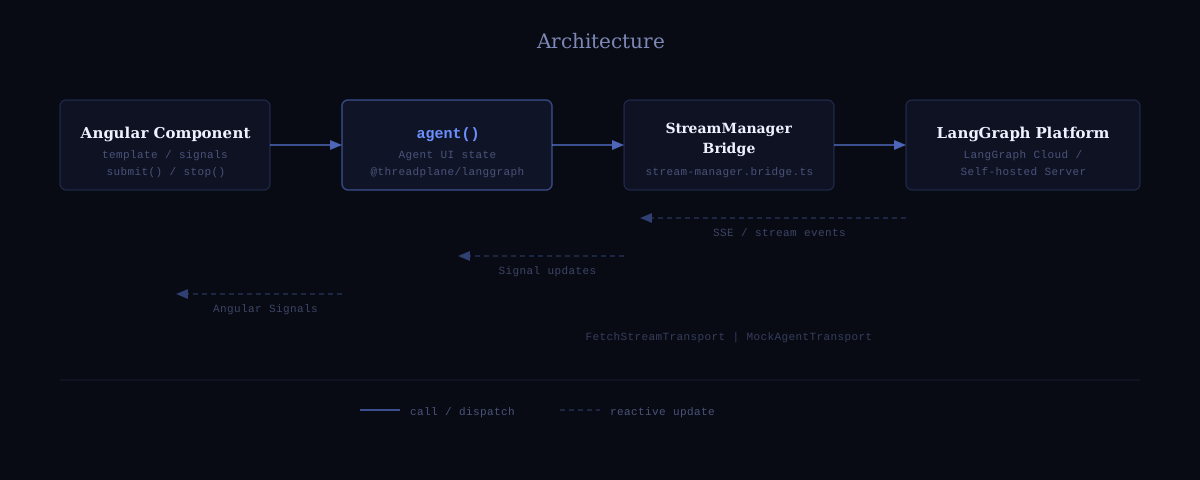
provideAgent() creates the agent's internal BehaviorSubjects at
injection-context time — once, when the provider factory runs. injectAgent()
retrieves the configured agent in any component. The StreamManager bridge (the
only file that touches @langchain/langgraph-sdk internals) pushes stream events
into those subjects. toSignal() converts each subject to an Angular Signal,
also at construction time. Dynamic actions (submit, stop, switchThread)
push into the existing subjects — no new subjects are ever created after
construction. This architecture is required because toSignal() must be called
in an injection context and cannot be called again later.